INSERT DISK 2
A web page that recreates installing a 1990s PC game under MS-DOS, from the BIOS beep and the IRQ/DMA settings to the "Please insert Disk 2 of 9" prompt. It invents a new fake game on every load.
A reenactment of installing a PC game from floppies (or a CD-ROM) in the 1990s. It boots through a fake BIOS POST and MS-DOS, INSTALL.EXE runs on its own, and from there it’s your job to get the thing installed.
What you do
- Accept the license and pick Typical, Full, Compact or Custom.
- Edit the destination path.
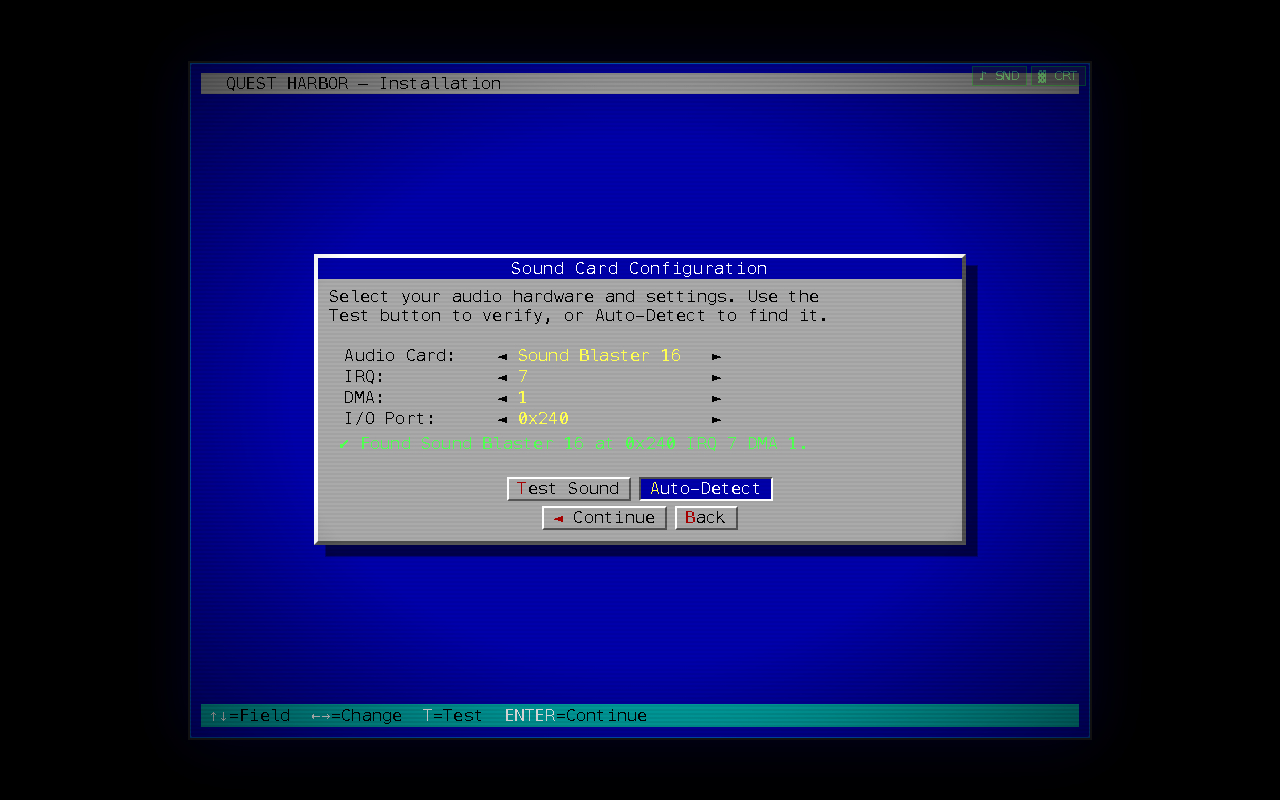
- Configure the sound card: choose the card, set the IRQ, DMA and I/O port, and press Test Sound. If the settings are wrong you get the classic “no card detected” error. Auto-Detect also works.
- Watch the files copy, with an overall progress bar and a per-disk one.
- Swap disks when it asks, and get through the occasional read error.
- Reach
INSTALLATION COMPLETED SUCCESSFULLYand launch the title screen.
The game is made up
Every load generates a different fictional game: genre (3-D action, graphic adventure, RPG, space sim, racing, RTS, pinball), title, publisher, release year, disk count and system requirements. Add ?seed= and any string to the URL to get the same game every time. The current seed is shown on the welcome and title screens.
Details
- It’s one self-contained HTML file with no dependencies and no network calls, so it also works offline.
- PC-speaker beeps, floppy-drive grinding and a Sound Blaster FM test jingle are all synthesized with the Web Audio API. Sound starts on your first keypress or click.
- Everything works from the keyboard (Enter, Esc, arrows, Tab, Space) or the mouse.
- There’s a CRT scanline flicker you can turn down, and a sound toggle.
Nothing is actually written to disk.
